




Stabilizer indicator lights show your voltage stabilizer’s operating status. Green means normal operation, yellow indicates low input voltage requiring load reduction, and red signals high output voltage requiring immediate equipment shutdown. Understanding these signals helps prevent damage and maintain safe operation.

Understanding Your Voltage Stabilizer Display
Modern voltage stabilizers use LED indicators to communicate critical operating information. These lights serve as your first line of defense against voltage problems that could damage expensive equipment.
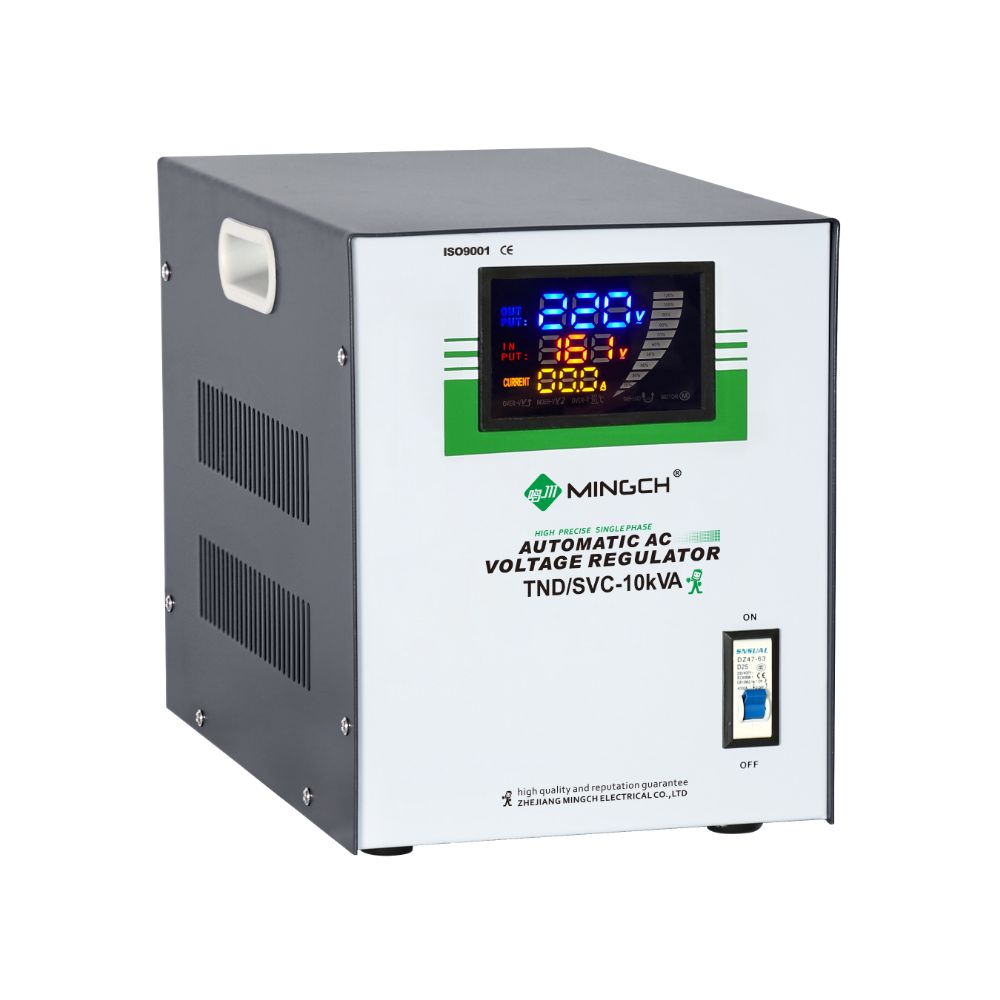
The control panel typically features three main indicator lights alongside digital displays showing current and voltage readings. Each light color corresponds to a specific operating condition that requires different responses.
Green Light: Normal Operation
The green “NORMAL” indicator confirms your voltage stabilizer is operating within safe parameters.
When this light is on, your system is functioning correctly. Input voltage falls within acceptable ranges, and the stabilizer is successfully regulating output to protect connected equipment.
You can operate all connected devices normally when the green light is active. The stabilizer is maintaining stable voltage output regardless of minor input fluctuations.

Yellow Light: Under-Voltage Warning
The yellow “UNDER-V” light indicates input voltage has dropped below safe operating levels.
When this warning appears, you need to reduce the electrical load immediately. Turn off non-essential equipment to help the voltage stabilizer cope with the low input voltage condition.
If the yellow light remains on after reducing load, shut down large equipment like motors, air conditioners, or heavy machinery. These devices draw significant current that the stabilizer cannot support during undervoltage conditions.
Continuing to operate at full load during undervoltage can damage both the stabilizer and connected equipment. The yellow light is your early warning to take protective action.

Red Light: Over-Voltage Alert
The red “OVER-V” indicator signals dangerous high voltage conditions requiring immediate attention.
Flashing red light means output voltage has reached the critical overvoltage protection threshold. Turn off backend equipment immediately to prevent damage. The stabilizer is warning you that voltage levels are approaching dangerous limits.
Solid red light indicates the voltage stabilizer has triggered overvoltage protection and automatically cut off output voltage. This protective function prevents damage to your valuable equipment, but means power has been disconnected until conditions improve.
Do not attempt to restart equipment while the red light is on. Wait for the light to change before reconnecting loads.
Digital Display Information
The control panel includes two digital displays providing precise voltage and current readings:
Input Current Display shows the amperage being drawn from the power source. Monitor this reading to ensure you’re not exceeding the stabilizer’s capacity.
Voltage Indication Display shows real-time voltage levels. This helps you track voltage fluctuations and understand why indicator lights activate.
Use these displays alongside the LED indicators for complete system monitoring. Understanding stabilizer indicator lights meaning becomes critical when voltage regulator fault codes appear through unusual display readings combined with indicator light patterns.

Troubleshooting with LED Indicators
Stabilizer indicator lights meaning becomes crucial during troubleshooting situations:
No lights active typically indicates power supply problems. Check input connections and circuit breakers before assuming equipment failure.
Multiple lights flashing suggests unstable input conditions. This often occurs during storms or when the electrical grid experiences problems.
Lights cycling on and off may indicate borderline voltage conditions where input voltage fluctuates around threshold levels.
Document light patterns when problems occur. This information helps technicians diagnose issues and can be valuable for warranty claims.

Preventive Actions Based on Indicators
Each indicator light requires specific responses to maintain system health:
For green light operation, maintain regular monitoring but no immediate action is needed. Continue normal equipment operation while watching for changes.
For yellow light warnings, immediately reduce electrical load by shutting off non-essential equipment. Check if local voltage conditions improve before reconnecting loads.
For red light alerts, shut down all backend equipment immediately and do not restart until the light clears. Investigate the cause of overvoltage before resuming normal operation.
Load Management Based on Indicators
Understanding how to adjust your electrical load based on indicator lights maximizes your voltage stabilizer’s effectiveness.
During yellow light warnings, disconnect high-power equipment first – motors, heaters, and compressors typically draw the most current. Keep essential lighting and control systems running.
For red light situations, create a priority list of critical versus non-critical equipment. Essential systems should restart first when conditions normalize.
Monitor the current display readings to understand your actual power consumption and make informed decisions about equipment disconnection.
Conclusion
Your voltage stabilizer’s LED indicators are essential safety tools that protect expensive equipment from voltage damage. The green light confirms normal operation, yellow warns of low voltage requiring load reduction, and red signals dangerous overvoltage needing immediate shutdown.
Understanding these signals and responding quickly prevents equipment damage and extends your voltage stabilizer’s service life. Regular monitoring combined with smart load management keeps your electrical systems running safely and efficiently.


